I have been skeptical of Graph RAG. I made a short video about that skepticism, and my issue was not that graphs are useless. The issue was the plumbing. For a lot of business problems, you have to decide what the nodes are, what the edges are, how to keep the graph updated, and how the agent is supposed to query it. By the time that is working, it is easy to wonder whether you built infrastructure or solved the original problem.
Code is a better fit than a lot of those examples. The relationships are already there. Functions call functions. Classes implement interfaces. Services depend on other services. API boundaries show up in the code. That does not make the graph trivial, but it does mean the graph is based on structure that already exists.
That is why GitNexus caught my attention. GitNexus indexes the codebase, extracts the symbol graph, and exposes that through the Model Context Protocol (MCP). OpenHands can stay focused on the coding task while GitNexus handles the repo intelligence. That is the part I wanted to test in a real repo, not a toy example.
I also recorded a video walkthrough of this test if you would rather watch it, but it does not explain some of the finer details that we cover here.
Starting With VS Code
For the test, I used a local checkout of VS Code / Code OSS. If the repo is small, grep is probably fine and I would not start by adding graph infrastructure. I wanted a repo large enough that search would produce real ambiguity.
The VS Code checkout was about 4.6 GB on disk. GitNexus indexed 11,454 files, 249,982 symbols, 966,616 edges, 11,767 clusters, and 300 processes.
That is the right size for this kind of test. A coding agent can still use plain search, but the agent now has to rank a lot of possible files and decide which relationship matters.
The Query
I used this query:
extension activation command registration execute commandThis is the kind of query I would actually give a coding agent. I know the concept I care about, but I do not know the file. I am asking for the part of VS Code where extension activation, command registration, and command execution meet.
The exact phrase search found nothing:
0 exact phrase matchesA broader fallback token scan did find material, but it touched 1,009 files. That does not mean grep failed. It means grep did what grep does. It found text, and then the agent had to decide what mattered.
When I ran the same no-MCP prompt with Sonnet, it did a few targeted searches for extension activation, registerCommand, and executeCommand, then landed on this file:
src/vs/workbench/api/common/extHostCommands.ts
Class: ExtHostCommands
That is a good answer. ExtHostCommands owns the extension-host side of command registration and execution. It stores the originating IExtensionDescription on the command handler, calls $fireCommandActivationEvent(id) during command execution, and forwards commands to the main thread when needed.
So I would not present this demo as “grep failed.” It did not. A strong model with grep found a strong starting point. The cost is that it had to run a small search-and-rank process to get there.
What GitNexus Returned
With GitNexus MCP, the useful result I got back was:
CommandService.executeCommand
src/vs/workbench/services/commands/common/commandService.ts
lines 51-89
This is also useful, but it is not the same answer. CommandService.executeCommand is the workbench command execution service. For the specific query about extension command registration and activation, I would give the better top-file answer to the no-MCP Sonnet run.
That is an important correction. The GitNexus story should not be that it always beats a strong model using grep on the first search. The stronger story is that GitNexus gives the agent a structured path once it has a symbol or subsystem to inspect.
The metrics from the OpenHands runs were still interesting:
| Run | Cost | Total tokens | Output tokens |
|---|---|---|---|
| Without GitNexus MCP | $0.5203 | 837,476 | 5,161 |
| With GitNexus MCP | $0.1273 | 33,022 | 338 |
I would treat this as an observed run, not a formal benchmark. Still, the difference is large enough to pay attention to. In this run, GitNexus gave the agent a focused structured result instead of making it spend a lot of context searching and sorting through the repo.
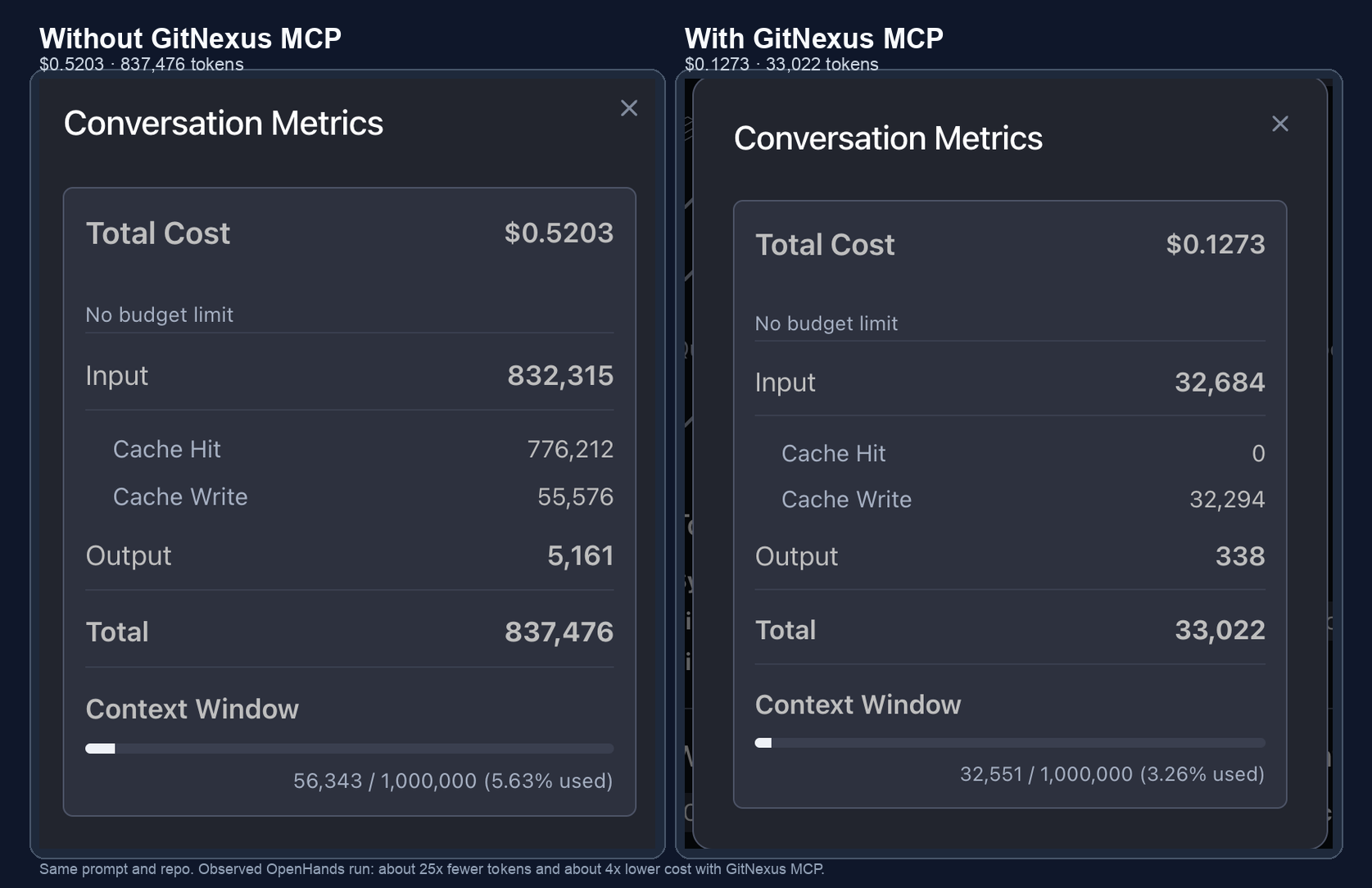
For a one-off question, that is useful. For an agent loop, it matters more because agents do not search once. They search, inspect, revise, search again, check impact, and then test. If the agent can ask for structure directly during those steps, it spends less time turning search results into a mental map of the repo.
Where The Graph Starts Helping
The demo I would run now is slightly different from the one I started with. I would let the no-MCP run find ExtHostCommands and give it credit. Then I would ask GitNexus the question that grep does not answer cleanly:
For ExtHostCommands.registerCommand and ExtHostCommands.executeCommand,
show the nearby symbols, calls, IPC boundary, and impact path.
That is where the graph should help. Once the agent has a good anchor, I want to know what surrounds it. What does it call? What implements the same interface? What fields does it touch? Where does it cross from the extension host to the main thread? Which symbols are nearby but easy to miss if I am just reading one file?
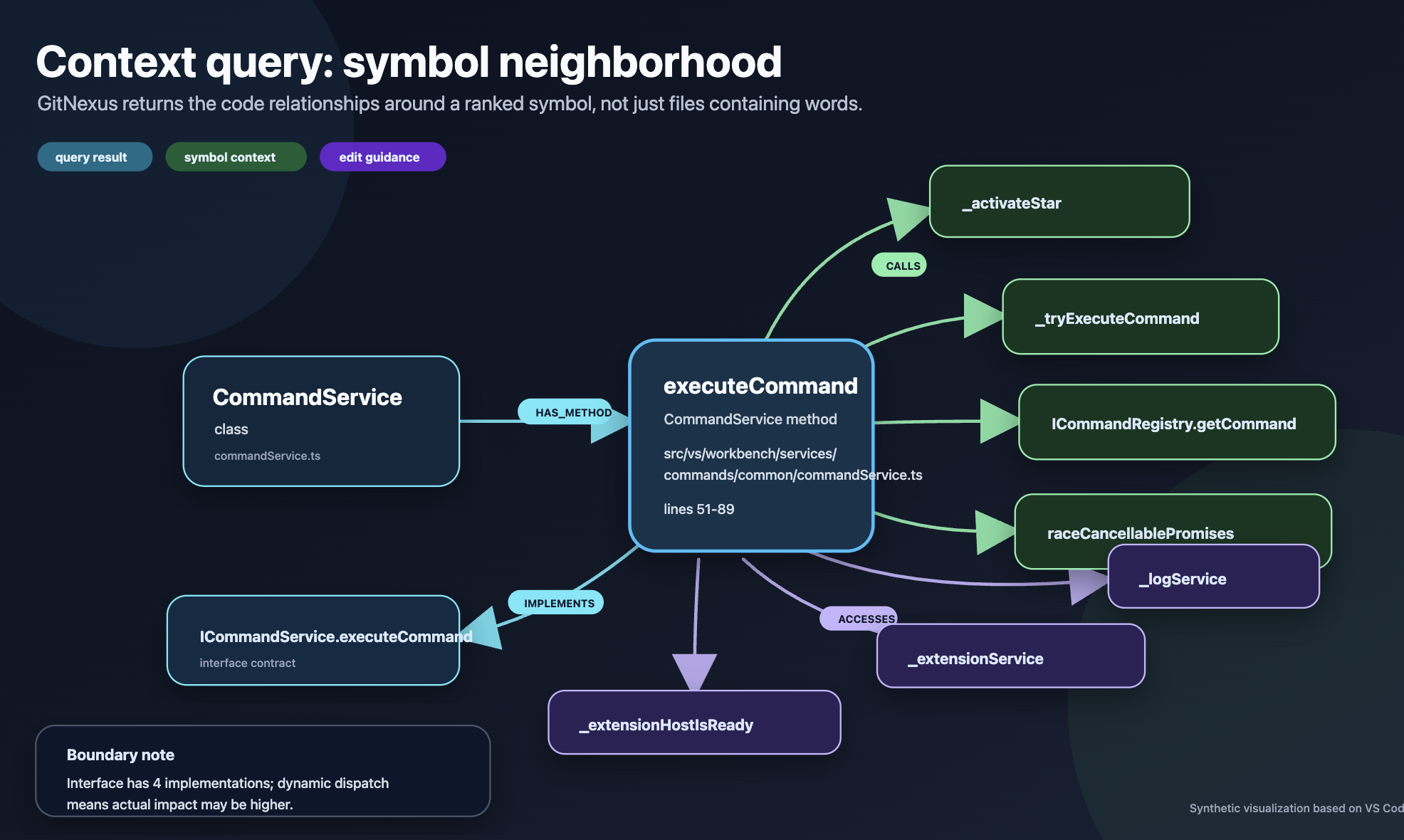
In my earlier GitNexus run, asking for context around CommandService.executeCommand produced this kind of neighborhood:
Calls:
_activateStar
_tryExecuteCommand
ICommandRegistry.getCommand
raceCancellablePromises

Implements:
ICommandService.executeCommand

Accesses:
_extensionHostIsReady
_extensionService
_logService
It also included a useful caveat:
executeCommand is an interface with 4 implementations, so callers that bind
through the interface may not all trace to this concrete symbol.
That is the kind of thing I want the agent to see before it edits code. The caveat tells you where the static view may be incomplete. A text search can find declarations and call sites, but it does not naturally package the answer as a symbol neighborhood with boundaries.
Blast Radius Is The Clearer Win
The cleanest GitNexus example was the impact query. I tested localize in src/vs/nls.ts.
At first glance, localize looks like a helper. In VS Code, it is structurally central:
Target: localize
File: src/vs/nls.ts
Risk: CRITICAL
Impacted count: 7,963
Direct impacts: 4,328
Depth 2 impacts: 3,635
Processes affected: 7
Modules affected: 20
That changes how I would want an agent to behave. If OpenHands sees that blast radius before editing, it should avoid casual API changes, preserve compatibility, inspect call sites, and run broader validation. The method may look small in the file, but the graph says it sits under a lot of the product.
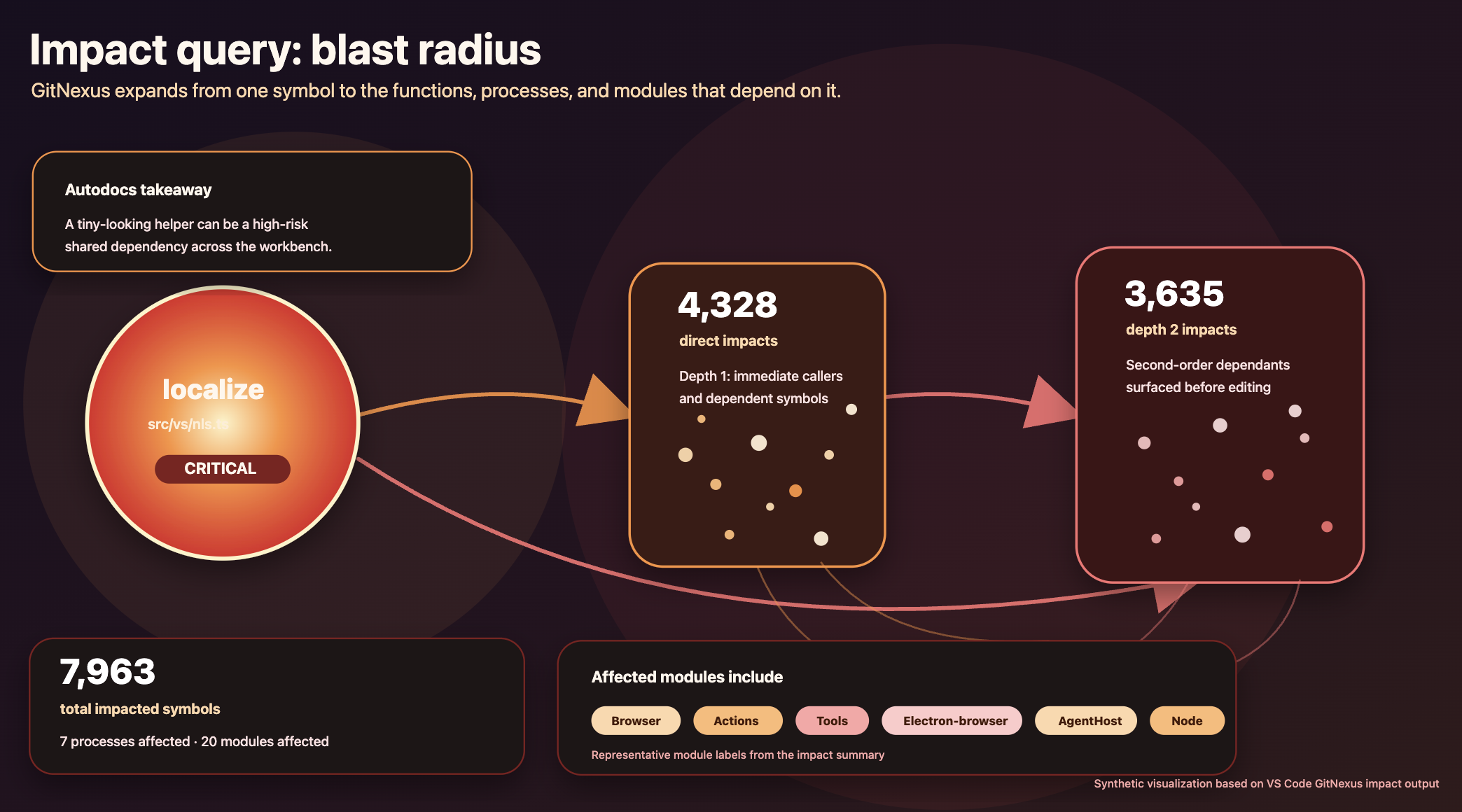
This is the part that feels most practical to me. GitNexus is not just helping the agent find code. It is helping the agent understand the risk of touching code.
How I Would Explain The Integration
I would not describe this as replacing grep. I still use grep constantly, and the Sonnet result is a good reminder that a strong model can do a lot with plain search.
The better framing is that grep gives the agent text evidence, while GitNexus gives it structural evidence. Those are different tools. On a large repo, I want both.
For OpenHands, the integration story is straightforward:
1. Index the repo with GitNexus.
2. Add GitNexus as an MCP server.
3. Ask OpenHands to find a ranked starting point.
4. Ask GitNexus for symbol context around that starting point.
5. Ask for impact before making risky edits.
Adding a MCP server in OpenHand’s Agent Canvas is covered in the docs. I also put the setup scripts and the VS Code walkthrough in an example repo if you want to reproduce this.
That would also be my suggestion for the GitNexus docs. I would not make a big logo claim that OpenHands is “supported.” I would show the workflow a developer would actually run, using OpenHands as the coding agent and GitNexus as the repo map.
The VS Code example is useful because it is not artificially easy. The no-MCP run found a strong file, which is good. GitNexus then becomes interesting for the follow-up work: structure, context, boundaries, and impact.
That is where I landed after trying this. Graph RAG for code is much more compelling when I do not have to build the graph system myself, and when the graph helps the agent answer practical engineering questions.
Not just “where is the text?”
“What am I looking at, and what happens if I change it?”